
Table of Contents
- Is Apex Hosting Worth It? – Honest Verdict
- Key Features of Apex Hosting
- In-Depth Review of Apex Hosting
- Apex Hosting Pricing & Plans
- Automatic Backups
- Pros and Cons of Apex Hosting
- Expert Opinion
- Server Setup & Launch Process
- Multicraft Panel Features
- Alternatives to Apex Hosting
- Provider Comparison Table
- Trustpilot Ratings
- Frequently Asked Questions
Is Apex Hosting Worth It? – Honest Verdict
Short answer: Yes — but it’s not for everyone.
Apex Hosting is one of the most established Minecraft-focused hosting providers on the market. It delivers strong uptime, stable performance, and beginner-friendly management tools. However, it comes at a slightly higher price point compared to budget competitors.
Who should choose Apex Hosting?
✅ Players who want reliability without technical complexity
✅ Growing communities running modpacks
✅ Users who value responsive 24/7 support
Who might consider alternatives?
❌ Budget-focused users looking for the lowest cost per GB
❌ Advanced administrators who want full VPS-level control
Overall, Apex Hosting is a premium managed Minecraft host that prioritizes stability and ease of use over aggressive pricing. If reliability matters more to you than saving a few dollars per month, it’s a solid option.
Key Features of Apex Hosting for Minecraft
- Game Support: Minecraft Java, Bedrock Edition and popular modpacks (Pixelmon, SkyFactory, RLCraft, etc.).
- Multicraft Control Panel: Intuitive and undestandable interface with one-click installation of mods, plugins, and packs.
- High-Performance Servers: CPUs with fast performance and NVMe SSD drives for minimal delay.
- Worldwide server locations: 18 locations worldwide, including the USA, Europe, Asia, and Australia — for low ping in any region.
- DDoS Protection: Built-in protection for all plans, no additional payment.
- Automatic Backups: Daily creation of backups with an option for quick recovery.
- Compatibility with Game mods and plugins: Supports Forge, Fabric, Spigot, Paper, and Bukkit.
- Fast Version Switching: you can change Minecraft versions and modpacks without data loss.
- Multi-Admin Access: Possibility to manage the server by several users.
- 24/7 Support: Fast help via chat, tickets, and knowledge base.
- Free Test Server: Option to check performance before purchase.
In-Depth Review of Apex Hosting
Company Overview
Apex Hosting isn’t just another server provider; this US-based (Florida) company consciously decided to focus solely on Minecraft server hosting for both Java and Bedrock Editions. By dedicating many years to this niche, they’ve rightfully earned a reputation as one of the most established, reliable, and expert providers in the Minecraft hosting arena.
Just to give you an idea of their scale: official statements assert that more than 300,000 servers have been launched using Apex’s infrastructure. It’s really impressive.
Global Reach: Coverage Where It Matters
If you’re worried about latency (lag), you can relax. Apex runs an enormous network of 18 different data center locations worldwide, including major spots like the U.S. (California, Oregon, Texas, Virginia, Florida, South Carolina), Canada, Brazil, the U.K., France, Germany, Poland, Singapore, Japan, Australia, and Israel. This ensures low latency for players across all major regions.
Company History
The story began in 2013 in Florida. A group of dedicated Minecraft enthusiasts set out to construct a server platform that was more dependable and simpler to use than anything else available. From day one, they kept their focus tight—only Minecraft. They immediately provided user-friendly features like automatic installation tools, the popular Multicraft control panel, and 24/7 technical support. What started as a small passion project quickly transformed into one of the world’s largest and most trusted Minecraft hosting providers.
What Apex Hosting Brings to the Table
Hardware and Performance, Lag-Free!
Apex servers are built on modern, high-performance hardware specifically designed for gaming. That means you get blazing-fast NVMe SSD storage, high-clock-speed CPUs, and low-latency network connections. All this power works together to guarantee smooth gameplay even when the server is under significant pressure.
For reference (Typical Performance Benchmarks):
- 2 GB RAM: Good for up to ~10 players.
- 4 GB RAM: Can handle up to ~25 players.
- 10 GB RAM: Ready for 150+ players.
The company doesn’t just promise; they vouch for 99.9% uptime, which is absolutely critical for any game server. On top of that, all plans incorporate robust built-in DDoS protection—meaning your server can handle peak gaming activity, hundreds of concurrent players, heavy mods, and large worlds without unexpected lag spikes.
Functionality and Ease of Use
- A free subdomain ([yourserver].apexmc.co) is included with most plans.
- You get one-click modpack installation and comprehensive support for all major Minecraft versions.
- The Multicraft control panel gives you the ability to monitor and optimize your CPU/RAM usage.
- A nice bonus: all plans feature unlimited player slots (though the actual ceiling will be determined by the resources you choose).
Apex Hosting Pricing and Plans
According to their official website, base plans start approximately at $5.99/month for 2 GB RAM. If you’re building a massive community or planning to run extremely heavy modpacks, more powerful options go up to 16 GB+ RAM.
A quick note on price: It’s fair to say that Apex’s pricing is marginally higher compared to some of the “budget” competitors out there. Essentially, you are paying a small premium for reliability, expertise, and rock-solid stability in a highly specific hosting niche.
| RAM | Price (First Month*) | Regular Monthly Price | Best For |
|---|---|---|---|
| 2 GB | ~$5.99 / month | ~$7.99 / month | Basic server without mods, up to ~10 players |
| 4 GB | ~$11.24 / month | ~$14.99 / month | Server with plugins or a small modpack |
| 8 GB | ~$20.99 / month | ~$27.99 / month | Modpack server or medium-sized community |
| 16 GB (EX Series) | ~$53.99 / month | ~$71.99 / month | Large server with many players, mods, and plugins |
| 32 GB | ~$77.99 / month | ~$103.99 / month | Large gaming community with heavy workloads |
Automatic Backups
The platform performs daily automated backups of all Minecraft worlds and server settings. This is particularly useful when installing new mods or updating game versions — if something goes wrong, you can quickly restore everything to its previous state.
- Backups are stored on separate servers, minimizing the risk of data loss.
- Restoration is available through the Multicraft control panel in just a few clicks.
- Users can also create manual backups or download their worlds via FTP.
Pros and Cons of Apex Hosting (Based on Reviews and Expert Opinion)
Pros Highlighted by Users
- Excellent Support: Many users praise the support team for quick responses and helpful guidance.
- Reliability and Ease of Use: Players often note that servers “run without lag” and are “easy to set up.”
- Suitable for All Levels: Works well for both beginners and advanced users running large modded communities.
Cons and Limitations
- Pricing: As mentioned earlier, plans are more expensive than some budget competitors — not ideal for tight budgets.
- “Unlimited Slots” Caveat: The actual number of players a server can handle depends on available RAM, CPU, and configuration.
- Advanced Access: Some experienced users mention limited flexibility compared to full VPS hosting (e.g., restricted FTP/SFTP control).
Expert Opinion
If you’re launching your own Minecraft server — whether to play casually with friends or to build a large community with mods and plugins — Apex Hosting stands out as one of the most balanced options in terms of reliability, performance, and support.
For smaller projects (10–20 players, no mods), you could opt for a cheaper alternative. But for serious setups — large player bases, complex modpacks, low latency, and continuous uptime — Apex is worth the investment. Stability and responsive support make the price reasonable.
Tip: Choose the data center closest to your players, monitor CPU/RAM usage, and optimize mods and plugins to minimize lag. Apex provides solid tools to help with all of that.
Server Setup and Launch Process
- Choose a Plan and Complete Payment. After selecting your preferred plan and completing the payment, you’ll receive an email with your registration details and the IP address for connecting to your server.
- Add the Server Using the Provided IP. Use the IP address from the email to add a new server in your account.
- Log In to the Multicraft Panel. Access the Multicraft control panel using the login credentials included in the same email.
Setting up a Minecraft server with Apex Hosting takes only a few minutes — even if you’ve never configured hosting before. Once your plan is activated, the system automatically deploys a ready-to-use server. All further actions are managed through the Multicraft panel, a user-friendly interface designed specifically for Minecraft hosting.
Within the Multicraft panel, you can:
- Select the Minecraft version (Java or Bedrock).
- Install modpacks or plugins from hundreds of available options in one click.
- Monitor server performance — memory usage, CPU load, and active players in real time.
- Manage files through the built-in file manager or via FTP access.
For beginners, this setup is extremely convenient — no need to manually edit configurations, upload mods, or type console commands. Everything works “out of the box,” while advanced users still have the freedom to fine-tune settings as needed.
Multicraft Panel Features
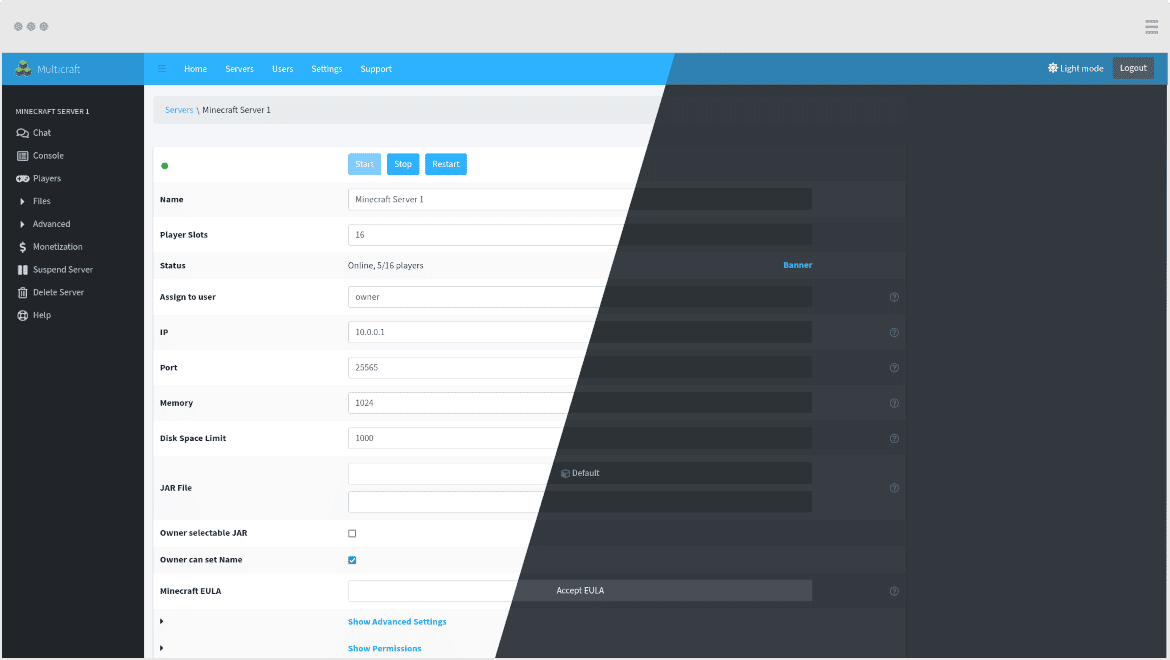
The Multicraft panel allows you to manage every important aspect of your Minecraft server — from game versions and mods to player lists and performance monitoring.
Available Tools:
- Real-time Console: View in-game events, messages, and enter admin commands instantly.
- Resource Monitoring: CPU and RAM usage graphs help you identify when your server needs more power.
- File Manager: Edit configuration files, upload plugins, and manage backups directly from your browser.
- Task Scheduler: Automate restarts, backups, and announcements on a set schedule.
If you’re a beginner, the interface is simple and intuitive. If you’re an experienced administrator, you can connect via FTP, access MySQL databases, and manually edit core configuration files.
Expert Comment: The Multicraft panel in Apex Hosting isn’t just a “pretty interface” — it’s a fully functional administrative tool for managing your Minecraft server. Everything is logically organised: key functions are easy to find, the panel runs smoothly with minimal lag, and if something goes wrong, you can restart the server instantly.
Alternatives to Apex Hosting
PebbleHost
- Offers affordable plans starting at about $1 per GB of RAM.
- Uses NVMe SSDs, includes DDoS protection, and has data centres in Europe, Australia, and North America.
- A great choice if you need a budget-friendly host with solid features.
BisectHosting
- Specializes in Minecraft and other game servers, provides one-click modpack installs, 20 global locations, and DDoS protection.
- Ideal for modded setups, advanced functionality, and larger projects.
ScalaCube
- Offers both free and paid plans, supports mods and plugins, includes SSD storage and DDoS protection.
- Good option for testing, small projects, or limited budgets.
GG Servers
- Known as a reliable provider with NVMe SSDs, free DDoS protection, global locations, and Multicraft control.
- A good pick if server geography and scalability matter.
HostHorde
- One of the oldest Minecraft hosts, focusing on stability and simplicity.
- Uses NVMe SSDs and automatic backups.
- Perfect for users who need reliable, unlimited slot servers without complex configuration.
| Provider | Game Support | Control Panel | Server Locations | Starting Price | Key Features |
|---|---|---|---|---|---|
| Apex Hosting | Minecraft (Java & Bedrock), ARK | Custom Multicraft | NA, EU, Asia | $7.49/mo | Easy setup, powerful hardware, 18 data centers, DDoS protection |
| PebbleHost | Minecraft | Multicraft | NA, EU, AU | $1.00/GB | Budget option, NVMe SSD, stable performance |
| BisectHosting | Minecraft & others | Bisect Panel | 20+ global | $3.00/mo | Great for modded servers and large projects |
| ScalaCube | Minecraft, Terraria, ARK | Custom Panel | Global | $2.50/mo | Free plan available, supports Forge and plugins |
| GG Servers | Minecraft & others | Multicraft | Global | $3.00/mo | Strong performance, responsive support |
| HostHorde | Minecraft only | Multicraft | NA, EU | $5.00/mo | Unlimited slots, stable servers |
Discount and Promo Opportunities at Apex Minecraft Hosting
| Promotion / Discount | What’s Currently Available (official from apexminecrafthosting.com) | How to Get It |
|---|---|---|
| Promo code APEX25 | Apex Hosting officially offers a promo code “APEX25” for 25% off your first order on game server hosting plans. This code applies to the first invoice only. | Enter “APEX25” in the promo code field at checkout when placing your first order. |
| Newsletter and official updates | Apex Hosting encourages subscribing to the newsletter to receive updates and exclusive offers, which may include future promo codes or special deals. | Subscribe to the Apex Hosting newsletter on the official website to receive email notifications about new promotions. |
| Seasonal and event promotions example | Apex Hosting has historically published seasonal promotions for holidays and special events (for example, Spring or Black Friday sales) offering discounts on server hosting during the event period. These appear in official blog posts when active, but are time-limited. | During a seasonal event, enter the specified promo code at checkout to apply the discount when the campaign is active. |
| Billing cycle savings | Apex Hosting supports different billing cycles (monthly, quarterly, etc.), where longer billing periods may result in effective savings compared to month-to-month pricing. | Select a longer billing term (for example quarterly) at checkout; the system will automatically recalculate the cost. |
Apex Hosting Reviews on Trustpilot: Analysis of Real User Experience
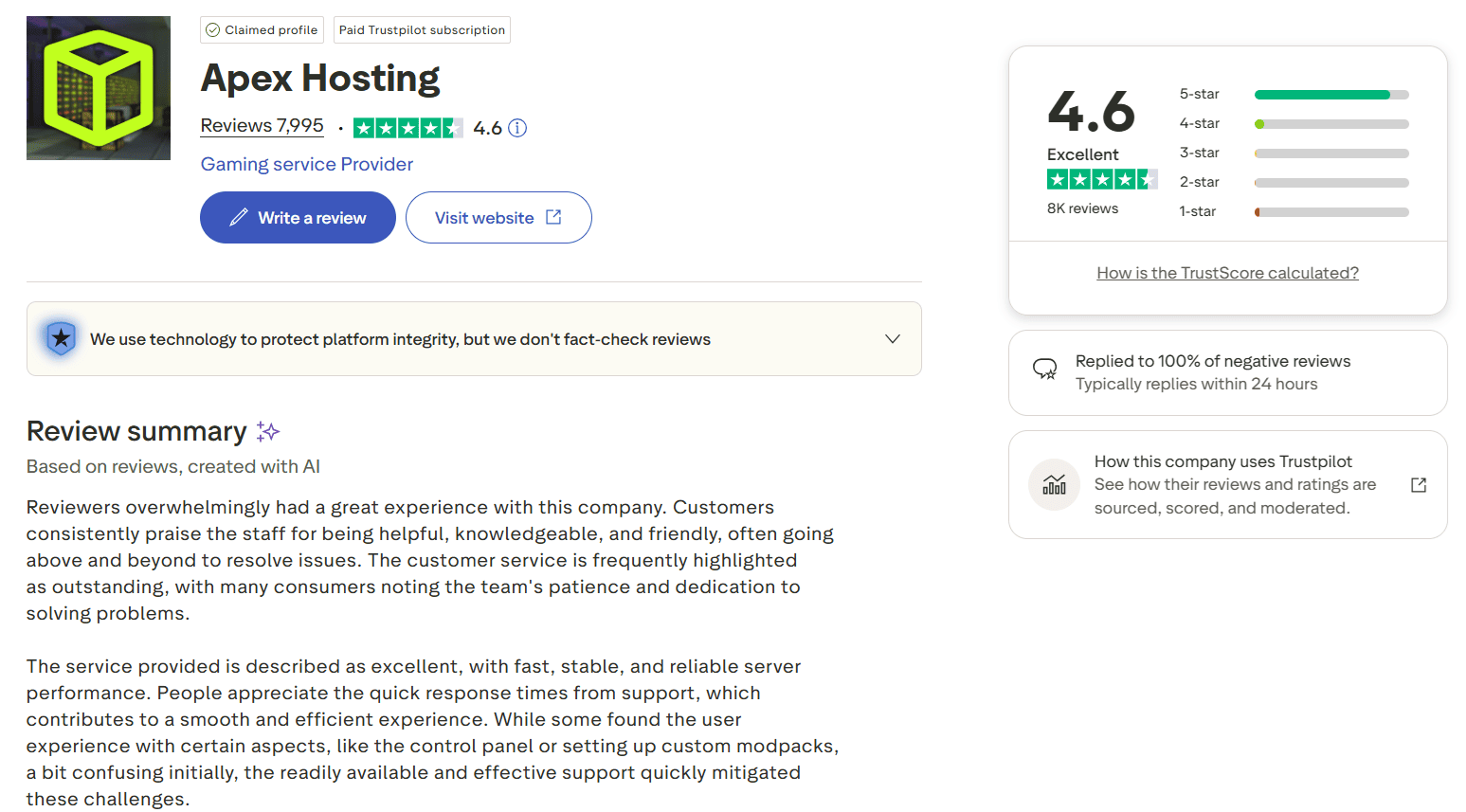
At the time of analysis, Apex Hosting maintains a high Trustpilot rating of approximately
4.5–4.6 out of 5, based on several thousand reviews. The majority of ratings are
5 stars, although critical feedback is also present. Below is a structured breakdown of recurring themes in user reviews.
Positive Reviews
Review #1 (5★)
A user highlights that customer support responded almost instantly and resolved a server issue
without lengthy back-and-forth communication. The reviewer specifically emphasizes the
professionalism and friendliness of the support team.
Analysis: Customer support is the most frequently mentioned strength of Apex
Hosting. Many reviews focus on fast response times and effective problem resolution. For new
Minecraft server owners, responsive support is a critical advantage and often the deciding factor.
Review #2 (5★)
Another customer reports stable server performance with no lag, an easy-to-use control panel,
and simple mod installation.
Analysis: Ease of setup and server management is another recurring positive theme.
Apex Hosting is often described as beginner-friendly, requiring minimal technical knowledge to
launch and maintain a server.
Mixed Reviews
Review #3 (3–4★)
A user expresses overall satisfaction with server performance but mentions initial setup
difficulties and slightly delayed responses from support during the first hours after purchase.
Analysis: Mixed reviews typically relate to onboarding experiences. Challenges
often arise from configuration complexity, mod setups, or user expectations rather than
infrastructure issues. These reviews suggest that experience may vary depending on project complexity.
Negative Reviews
Review #4 (1–2★)
A reviewer criticizes the control panel, describing it as unintuitive or overly complicated.
Analysis: The most consistent criticism involves the user interface and control
panel design. Advanced users occasionally find it restrictive or not flexible enough. While not a
dominant complaint, it appears regularly in lower-rated reviews.
Review #5 (1★)
Some negative feedback mentions billing issues, refund concerns, or delayed communication regarding
account-related matters.
Analysis: Critical reviews more commonly focus on administrative aspects such as
billing and cancellations rather than server performance. The proportion of these reviews remains
relatively small compared to the overall volume of positive feedback.
Review Trends Over Time
A review of both older and recent feedback indicates consistent themes:
- Customer support has remained a strong point across multiple years.
- Recent reviews more frequently mention modded servers, complex configurations, and higher
technical demands, reflecting evolving user expectations. - Criticism of the control panel has appeared consistently over time, suggesting an ongoing
usability concern rather than a temporary issue.
Overall, sentiment toward Apex Hosting remains predominantly positive. The core strengths—support
responsiveness, reliability, and ease of use—have remained stable over the years.
Overall Conclusion
Trustpilot reviews indicate that Apex Hosting is widely perceived as a reliable Minecraft hosting
provider with strong customer support and stable server performance. The main drawbacks relate to
control panel usability and occasional billing concerns.
The overall pattern suggests that the service is well-suited for beginners and mainstream users,
while advanced users may encounter limitations depending on their technical requirements.
Frequently Asked Questions about Apex Hosting
How can I cancel my Apex Hosting subscription?
To cancel your server, log in to your Apex Hosting control panel, go to Billing → Select your server → Request Cancellation. You can choose to cancel immediately or after your current billing period ends. Once confirmed, the server will be deleted and billing will stop.
How do I download my Minecraft world from Apex Hosting?
- Go to the Multicraft control panel on the Apex Hosting website.
- Open Files → FTP File Access.
- Enter your password and click Login.
- Locate the world folder (or your custom world name).
- Select it and click Download at the bottom of the page.
You’ll receive a ZIP file that can be unpacked locally or uploaded to another server.
How can I install mods on my Apex Hosting server?
- Open your Apex Hosting control panel and select your server.
- Under Game File, choose a modded Minecraft version such as Forge or Fabric.
- After installation, restart your server.
- Go to FTP File Access and upload your .jar mod files into the mods folder.
- Restart the server again to activate the mods.
Tip: Make sure the same mods are installed both on your client and server, otherwise you won’t be able to connect.